Voice AI in business systems: how a voice agent integrates with CRM and ERP
Imagine you’re driving to a client meeting. Or you’re out in the field — on a production floor, in a warehouse, out in the open. You don’t have a laptop in front of you. You’re not clicking through a system or filling in forms. And yet you can still check your meetings, add a note to the CRM, save a task, or create a new activity — simply by speaking.
This isn’t a futuristic vision — it’s a very concrete direction in the evolution of how we interact with business systems.
From a field problem to a voice agent in CRM
The origins of this type of solution are highly pragmatic. In one of our projects, the starting point was a client whose employees spent most of their time outside the office — on the road, with customers, out in the field. They weren’t sitting at a computer with the CRM open, yet they still needed to:
How does an AI voice agent work?
At the heart of the solution is an agent — an application that acts as an intermediary between the user and business systems. The user communicates with it through a simple web application, and the agent:
- captures the user’s voice,
- understands the intent of the utterance,
- decides which tool (that is, which API) should be called,
- performs the action in the system (e.g. CRM),
- responds to the user with voice feedback.
A key role here is played by the Azure Voice Live service. Instead of building a complex chain:
For the integrator, this is a major simplification. There’s no need to worry about synchronizing steps or dealing with latency — the conversation with the agent feels natural. You can even interrupt it mid‑sentence, and it will “understand.”
An agent that acts on your behalf (and only within your scope)
A very important aspect, often overlooked in marketing descriptions: security and user context.
The agent doesn’t have magical access to the entire system. It acts on behalf of a specific user and only within that user’s permissions. If the user doesn’t have access to certain information in the CRM, the agent won’t see it either. If the user isn’t allowed to create or edit something, the agent won’t do that.
From an organizational perspective, this is crucial: a voice conversation doesn’t bypass security mechanisms – it uses them.
CRM is just the beginning
When an agent is integrated with CRM, you can use voice to:
Use cases of a voice agent in CRM and operational work
1. A voice agent for sales teams and field work
This is one of the most obvious — but also one of the most valuable — scenarios.
A sales rep:
2. Voice notes, tasks, and quick CRM queries
A voice agent also works great as an information access layer — not just for executing actions.
3. Working outside the office — warehouse, service, production
Examples:
4. An AI agent as a universal interface to multiple systems
Not every user feels comfortable with complex business systems. For some people, the barrier isn’t a lack of functionality, but the way they interact with the system.
Voice is increasingly being used at the desk as well — as an alternative to typing.
Prompt engineering in voice agents — the key to reliable performance
Paradoxically, the biggest challenge isn’t the integration — it’s good instructions for the agent. In other words: prompt engineering.
You need to clearly define:
On top of that, there are parameters such as:
Response temperature: precision vs. naturalness
In the agent configuration, an important parameter is the so‑called temperature:
Speech detection and interruption handling
Voice Live supports mechanisms for:
Speech synthesis and the Polish language
Not all available voices handle the Polish language equally well. In practice:
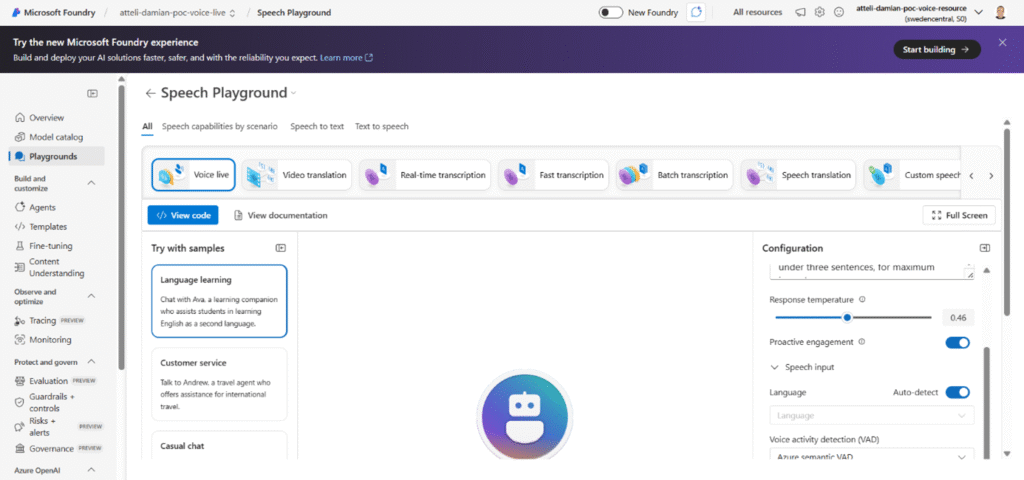
Voice agent settings
What's next?
Not every company needs a voice agent — but wherever users are on the move, work outside the office, or struggle with an overload of interfaces, voice can be a game‑changing improvement in quality.